
The device configurator allows you to conveniently set the measurement devices, as well as save and transfer the settings.
For further information on the functions of the measurement device, please refer to the respective user manual, which can be downloaded from our website www.janitza.com.
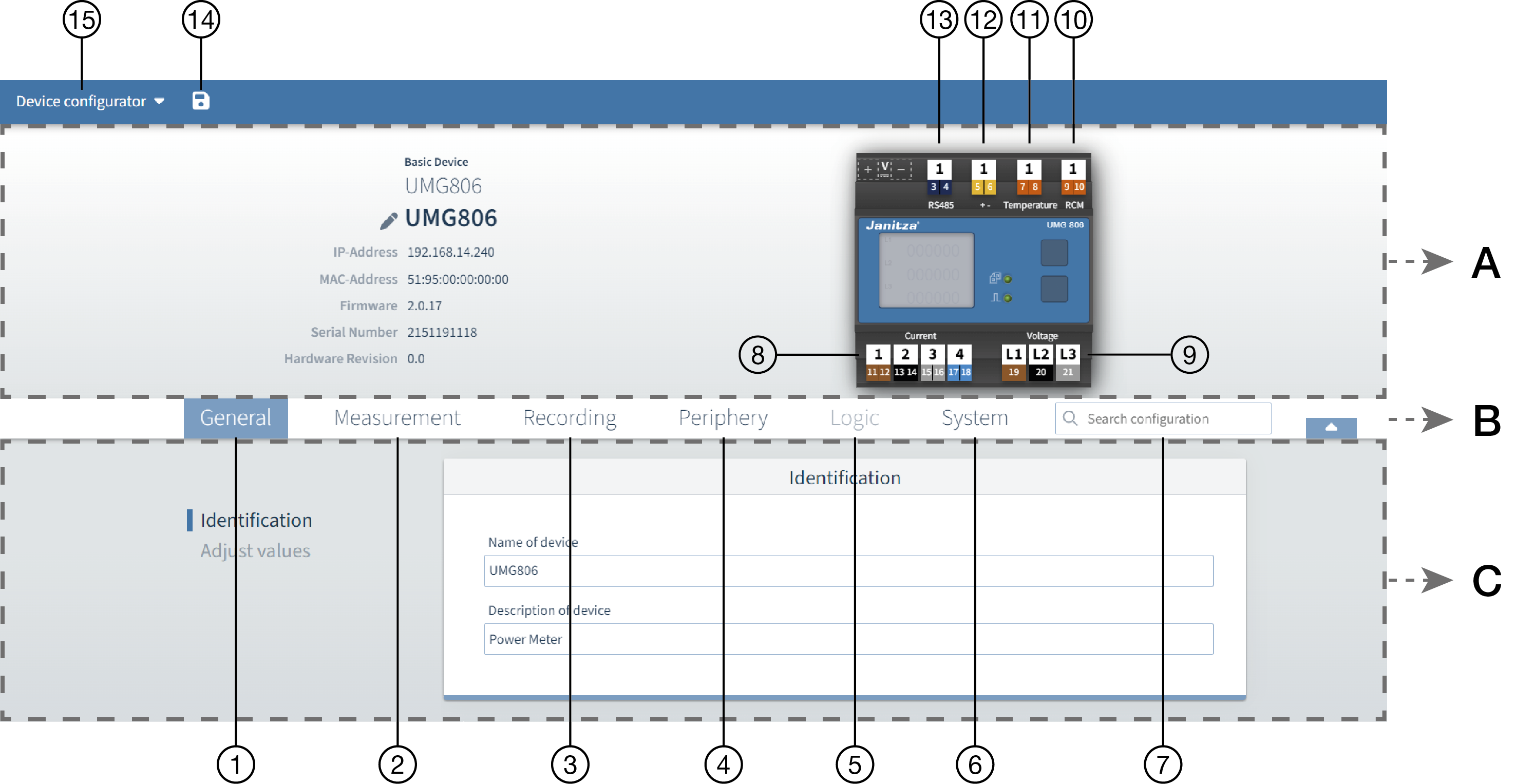
| Area | Description |
|---|---|
| A - Info & Configuration | In this section you will find basic information about the device, as well as a graphic illustration of the device. |
| B - Menu bar | You can quickly navigate to the desired configuration card using the tabs for the corresponding main categories and the search field. |
| C - Configuration | The lower area shows the set parameters and you can adjust them. |
| Position | Description |
|---|---|
| 1 | General - Adapt device designations and set values |
| 2 | Measurement - Parametrize current and voltage transformers, as well as RCM settings |
| 3 | Recording - Overview of which measured values are recorded by the device |
| 4 | Periphery - Set temperature corrections and parametrize the inputs and outputs of connected modules |
| 5 | Logic - No function |
| 6 | System - Make time and communication settings for the device |
| 7 | Search field - Search field to search for specific settings |
| 8 | Current measurement inputs - Clicking on the inputs opens the corresponding configuration menu |
| 9 | Voltage measurement inputs - Clicking on the inputs opens the corresponding configuration menu |
| 10 | RCM input - Clicking on the input opens the corresponding configuration menu |
| 11 | Thermistor input - Clicking on the input opens the corresponding configuration menu |
| 12 | Pulse output (active energy) - Clicking on the output opens the corresponding configuration menu |
| 13 | RS-485 interface - Clicking on the input opens the corresponding configuration menu |
| 14 | Diskette icon - Save configuration and transfer it to the device |
| 15 | Transfer menu - Create or load backups; transfer configuration parameters to one or more devices |